A Deep Dive into Postgres Connections, Sessions, and Advisory Locks (Part 1)
Understanding how your database processes connections and locks is critical for avoiding catastrophic outages. In this article, we will tear down the PostgreSQL operating system processes and empirically prove how sessions and advisory locks interact.
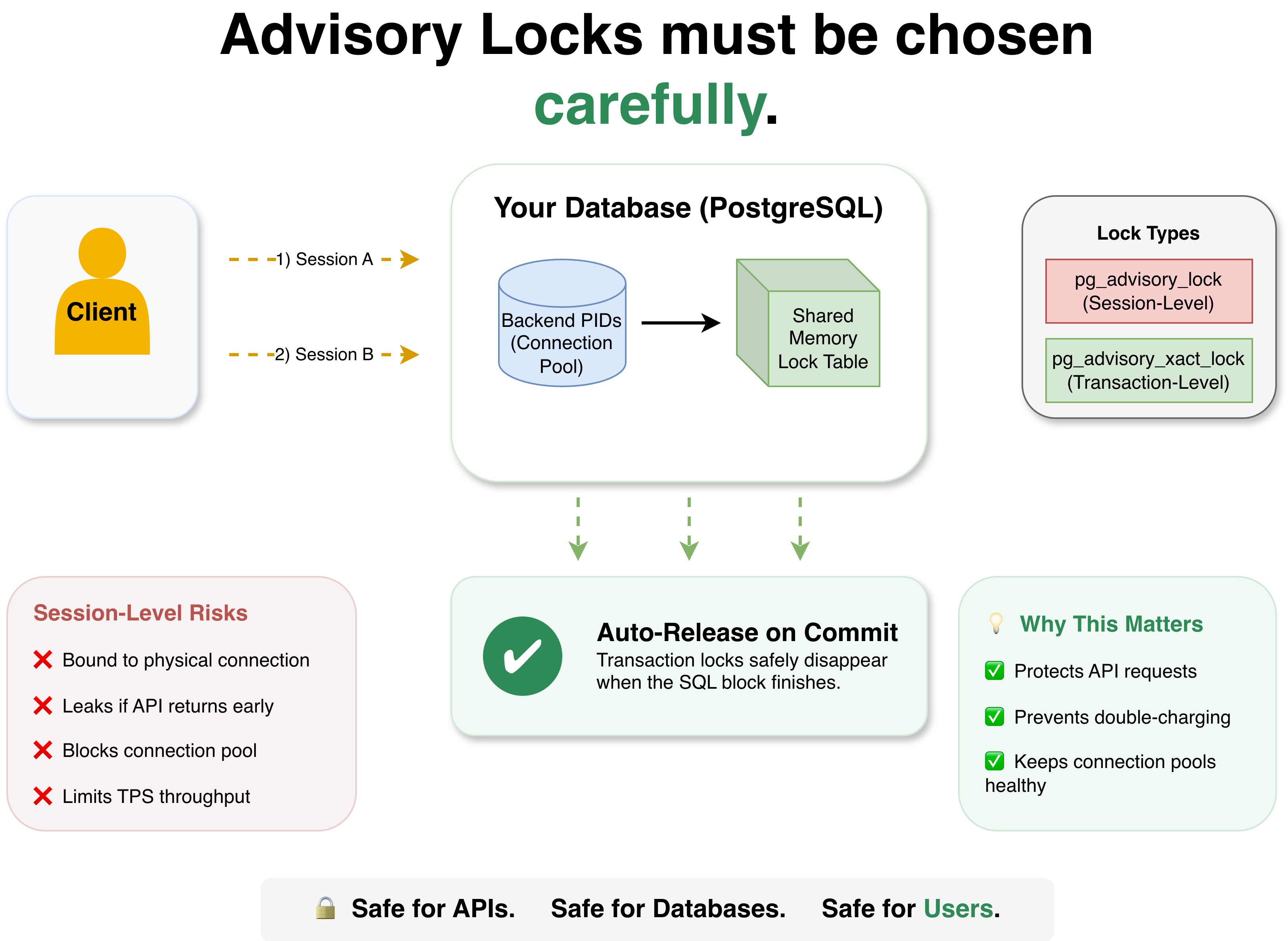
1. Core Architecture Terminology #
To understand database bottlenecks, we must first decouple network protocol terms from operating system structures:
- Connection (Network Layer): A physical TCP/IP socket wire opened between the application and the database server over port 5432.
- Session (Database Context Layer): The isolated runtime environment inside the database engine that tracks variables, temporary tables, and session-scoped locks.
- Backend Process (Operating System Layer): A dedicated worker process spawned by the host OS kernel to manage exactly one Session.
The Golden Rule of Direct Database Architecture: Without a multiplexing proxy (like PgBouncer in transaction mode), 1 Connection = 1 Session = 1 Backend Process (PID).
Environment Setup #
The experiments in this article were conducted using PostgreSQL 16 (postgres:16-alpine) running inside a local Docker container on macOS, using psql version 18.3 as the client.
To easily test connection starvation, we explicitly limited the database to a maximum of 5 concurrent connections by passing -c max_connections=5 to the Docker entrypoint.
Let’s prove this rule and explore how locks work by running a few experiments against our local PostgreSQL container.
Experiment 1: Proving 1 Connection = 1 PID #
Problem:
When we connect to a database from our local machine (the client), we get a Process ID (PID) from our OS. But the server (PostgreSQL) also assigns a PID. We want to prove that the Postgres parent process (Postmaster) forks a dedicated backend process for every single connection, and understand why the client port and PID are totally different from the server’s.
Script: We can run a bash script to open 3 concurrent background connections that simply sleep, forcing the connections to stay open:
echo "Opening 3 background connections..."

psql -h localhost -U testuser -d testdb -c "SELECT pg_sleep(30);" > /dev/null 2>&1 &
psql -h localhost -U testuser -d testdb -c "SELECT pg_sleep(30);" > /dev/null 2>&1 &
psql -h localhost -U testuser -d testdb -c "SELECT pg_sleep(30);" > /dev/null 2>&1 &

sleep 0.5

psql -h localhost -U testuser -d testdb -c "
select pid, client_addr, client_port, query from pg_stat_activity where query ilike '%pg_sleep%';
"Result:
 pid | client_addr  | client_port |                             query
-----+--------------+-------------+---------------------------------------------------------------
 532 | 192.168.65.1 |       30682 | SELECT pg_sleep(30);
 533 | 192.168.65.1 |       37303 | SELECT pg_sleep(30);
534 | 192.168.65.1 | 46689 | SELECT pg_sleep(30);Result Explanation:
First, notice the client_port. While the server listens on port 5432, the client uses ephemeral ports (30682, 37303, etc.). This is the TCP 4-Tuple at work. If your Mac used port 5432 for the client too, it could only ever make exactly one connection. By dynamically assigning random high-number client ports, the OS can keep track of thousands of concurrent connections.
Second, if you check lsof -i :5432 on your Mac, you’ll see completely different PIDs for the psql client processes:
psql      99468 vubon ... TCP localhost:54158->localhost:postgresql (ESTABLISHED)
psql      99469 vubon ... TCP localhost:54157->localhost:postgresql (ESTABLISHED)
psql 99470 vubon ... TCP localhost:54156->localhost:postgresql (ESTABLISHED)Why are the PID numbers different? Because we are looking at two different sides of the network on two different operating systems.
The PIDs shown by lsof (e.g., 99468) are the Client Processes assigned by macOS to your terminal commands. The PIDs shown by pg_stat_activity (e.g., 532) are the Server Backend Processes. They are assigned by the Linux Kernel inside the Docker container.
How do we know they were spawned by Postgres? If we run ps -o pid,ppid,args inside the Docker container:
  PID  PPID COMMAND
    1     0 postgres -c max_connections=5 ...
532 1 postgres: testuser testdb 192.168.65.1(30682) SELECTThe sleep queries all have a Parent Process ID (PPID) of 1. This provides undeniable proof that PID 1 (the main Postmaster) used the fork() system call to clone itself into those backends!
Experiment 2: Session Locks and Wait Events #
Before we run the experiment, we need to understand what a “Session-Level Lock” is.
PostgreSQL maintains a global Shared Memory Lock Table visible to all active child PIDs. Advisory locks are abstract mathematical identifiers recorded in this shared space. When you use pg_advisory_lock(), you are creating a Session-Level Lock. This means the lock is strictly bound to the database connection (the backend PID). It will not be released until you explicitly unlock it or the connection is entirely closed.
Problem:
We want to see exactly what happens inside PostgreSQL when two sessions try to grab the same lock. How does Postgres queue them, and how can we debug blocked queries using pg_stat_activity and pg_locks?
Script:
We configure two concurrent sessions. Session A grabs an advisory lock using the mathematical identifier 42 (pg_advisory_lock(42)) and sleeps. Because Session B explicitly requests the exact same lock ID (42) immediately after, it will attempt to grab the exact same lock from the shared memory table.
echo "Session A: Acquiring pg_advisory_lock(42) and holding for 10 seconds..."
PGAPPNAME="Session A" psql -h localhost -U testuser -d testdb -c "SELECT pg_advisory_lock(42); SELECT pg_sleep(10);" > /dev/null 2>&1 &
SESS_A_PID=$!
sleep 1

echo "Session B: Attempting to acquire pg_advisory_lock(42)..."
PGAPPNAME="Session B" psql -h localhost -U testuser -d testdb -c "SELECT pg_advisory_lock(42); SELECT pg_sleep(5);" > /dev/null 2>&1 &
SESS_B_PID=$!Result:
Visual Log 1 (Session B is blocked by Session A)
 pid | application_name | state  | wait_event_type | wait_event | locktype | granted
-----+------------------+--------+-----------------+------------+----------+---------
 538 | Session A        | active | Timeout         | PgSleep    | advisory | t
 540 | Session B        | active | Lock            | advisory   | advisory | f

Visual Log 2 (After Session A finished, Session B wakes up)
 pid | application_name | state  | wait_event_type | wait_event | locktype | granted
-----+------------------+--------+-----------------+------------+----------+---------
540 | Session B | active | Timeout | PgSleep | advisory | tResult Explanation:
granted:t(True) means the session successfully acquired the lock. Session B’sgrantedisf(False) because it was denied and queued up.wait_event_type&wait_event: This tells us why the process is pausing.- Session A has the lock. It’s pausing because we explicitly told it to
pg_sleep(10). Under the hood, PostgreSQL sets an OS timer to sleep, which is why its wait type isTimeoutand the event isPgSleep. - Session B was denied the lock. The database engine forcefully pauses it, shifting its wait type to
Lockand its event toadvisory.
- Session A has the lock. It’s pausing because we explicitly told it to
Because Session B is forced to wait at the OS layer by the database engine, it refuses to read data from its TCP wire. To the application, the network connection is permanently “frozen.” Once Session A finishes, Session B immediately wakes up, transitions to granted: t, and takes over the lock!
When should you use a Session-Level Lock? (Payment Domain) #
Because Session Locks are tied to the physical database connection and not an SQL transaction, they completely hijack the backend process.
The TPS (Transactions Per Second) Bottleneck Rule: If you use a session-level lock, it totally blocks the database connection. This means if your database is limited to 100 connections, your maximum possible throughput for that locked operation is exactly 100 TPS.
Because of this severe limitation, you must choose your locking strategy carefully.
When you SHOULD use pg_advisory_lock (Session-Level):
These are best fit for long-running, singleton processes that span multiple database transactions.
- Example 1: A nightly Payment Reconciliation cron job that processes hundreds of thousands of transactions. You want to lock the entire worker process for hours so no other cron job can run simultaneously.
- Example 2: Database migration scripts (e.g., locking the database so two servers don’t attempt to run schema migrations at the exact same time).
- Example 3: Long-running financial report generation tasks that aggregate data across many distinct
BEGIN/COMMITblocks.
When you should NOT use pg_advisory_lock:
You should actively avoid session locks for rapid, user-facing web requests. (You should use pg_advisory_xact_lock for these instead!).
- Example 1: Processing a real-time customer checkout.
- Example 2: Executing an API refund request via the Stripe API.
- Example 3: User registration endpoints (preventing duplicate signups).
If your application logic fails during an API request and the connection is returned to the pool without explicitly unlocking, that physical connection will hold the lock forever—permanently breaking all future checkouts for that user!
Experiment 3: Proving Session Locks Survive Commits #
Problem:
We claimed that a session lock is dangerous for API requests because it stays attached to the connection. But what if your application explicitly calls COMMIT on the transaction? Does the commit clear the session lock? We need empirical proof that it does not.
Script:
We can run a single SQL script that begins a transaction, acquires a session lock (pg_advisory_lock), commits the transaction, and then immediately checks pg_locks to see if the lock is still held by our own connection (pg_backend_pid()):
psql -h localhost -U testuser -d testdb -c "
BEGIN;
SELECT pg_advisory_lock(99);
COMMIT;
-- Check if lock 99 is still held by our own connection
SELECT granted, locktype FROM pg_locks WHERE locktype = 'advisory' AND pid = pg_backend_pid() AND objid = 99;
"Result:
BEGIN
 pg_advisory_lock
------------------

(1 row)

COMMIT
 granted | locktype
---------+----------
 t       | advisory
(1 row)Result Explanation:
The output is definitive proof. Even after the COMMIT statement successfully completes, the query to pg_locks returns granted = t. The lock is still 100% active!
If your application logic returns an error or panics during an API request, and the database connection is returned to the Go connection pool without explicitly executing SELECT pg_advisory_unlock(99), that physical connection will sit in the pool indefinitely, still holding the lock. Any future request that randomly grabs that exact connection will be blocked forever!
Experiment 4: Transaction Locks vs Session Locks #
Problem:
Session-level locks (pg_advisory_lock) are dangerous because they are bound to the connection itself, as proven above. We want to test transaction-level locks (pg_advisory_xact_lock) to see how they auto-release safely.
Script:
We run pg_advisory_xact_lock inside a transaction block (BEGIN and COMMIT):
echo "Session C: Acquiring pg_advisory_xact_lock(42) in a transaction..."
psql -h localhost -U testuser -d testdb -c "BEGIN; SELECT pg_advisory_xact_lock(42); SELECT pg_sleep(2); COMMIT;" > /dev/null 2>&1 &
SESS_C_PID=$!

sleep 1

psql -h localhost -U testuser -d testdb -c "
SELECT pid, wait_event_type, query FROM pg_stat_activity WHERE query ILIKE '%BEGIN%';
"Result:
 pid | wait_event_type |                                query
-----+-----------------+----------------------------------------------------------------------
544 | Timeout | BEGIN; SELECT pg_advisory_xact_lock(42); SELECT pg_sleep(2); COMMIT;After 2 seconds, the process commits, and the lock is wiped from pg_locks automatically.
Result Explanation:
- Session-Level Locks require a manual
pg_advisory_unlock()or a full disconnect. - Transaction-Level Locks are strictly tied to the SQL Transaction. As soon as you hit
COMMITorROLLBACK, PostgreSQL automatically cleans them up.
If you are using this in an application (like refunding a Stripe payment to prevent double-charging), you should always prefer pg_advisory_xact_lock. If your application crashes in the middle of the HTTP request to Stripe, the database transaction automatically rolls back and safely releases the lock.
Summary Comparison #
| Feature | pg_advisory_lock (Session-Level) | pg_advisory_xact_lock (Transaction-Level) |
|---|---|---|
| Scope | Bound to the database connection (PID). | Bound to the current SQL transaction (BEGIN/COMMIT). |
| Auto-Release | No. Must be explicitly unlocked or the connection closed. | Yes. Automatically releases on COMMIT or ROLLBACK. |
| Danger Level | High. Connection pools can leak locks if the app fails to unlock. | Low. Safe for API requests and connection pools. |
| Best Use Case | Long-running background workers, cron jobs, DB migrations. | Rapid API requests, user checkouts, 3rd-party API calls. |
| TPS Impact | Blocks the entire connection; throughput limited by max connections. | Only blocks during the transaction window. |
In Part 2 of this series, we will explore what happens when these frozen database connections crash into an application’s connection pool, and how to safely mitigate pool starvation using Go and GORM.