A Deep Dive into Model Context Protocol (MCP)
Think about the last time you wanted to give an AI assistant access to your company’s data. Maybe you wanted it to query your internal Postgres database, read your Slack messages, or pull context from your Jira tickets.
Historically, this meant building a custom, one-off integration for every single data source and every single AI model. You’d write a specific plugin for ChatGPT, another for Claude, and yet another for your internal tools. It was a fragmented, unscalable mess of custom API wrappers.
This is the exact problem the Model Context Protocol (MCP) solves.
What is Model Context Protocol (MCP)? #
Introduced by Anthropic, the Model Context Protocol is an open-source standard designed to be the “USB-C port for AI applications.” (You can read their official introduction here). It provides a universal, standardized way to connect AI assistants to external data sources, enterprise tools, payment gateways, and other critical systems.
Instead of writing separate integrations for every platform, you build one MCP server. Any MCP-compliant client (like Claude Desktop, Cursor, or your own custom app) can instantly discover and use it.
The Architecture: How It Works #
MCP uses a straightforward client-server architecture communicating via JSON-RPC 2.0.
Here is a simplified view of the ecosystem:
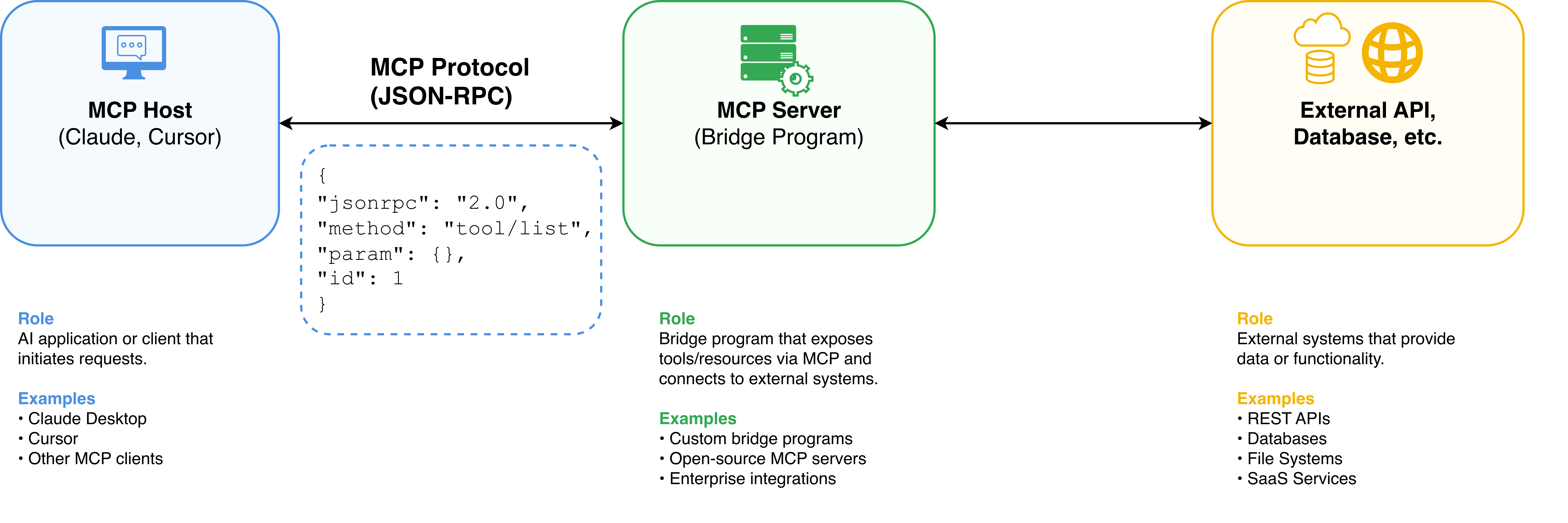
The ecosystem is broken down into three main components:
- MCP Hosts (Clients): These are the AI applications you interact with. The host initiates the connection to an MCP server and routes requests between the AI model and the server.
- MCP Servers: These are lightweight programs that act as bridges. An MCP server connects to a specific data source (e.g., your local file system, a SQLite database, or the GitHub API) and exposes its capabilities to the host in a standardized way.
- The Protocol: The JSON-RPC rules that dictate how the host and server communicate. It allows the AI to securely discover what tools and data are available without needing to know the implementation details.
What Can an MCP Server Expose? #
An MCP server can provide three distinct types of capabilities:
- Tools: Executable functions the AI can call to perform actions (e.g.,
create_charge,refund_transaction). - Resources: Data the AI can read to gain context, such as system logs, markdown documents, or configuration files.
- Prompts: Pre-defined templates or workflows that help users interact with specific systems more effectively.
A Quick Look at the Protocol #
When an MCP host connects to a server, it can ask for the available tools. The server responds with a JSON-RPC payload describing what it can do.
Here is what a tool definition might look like under the hood:
{
  "jsonrpc": "2.0",
  "id": 1,
  "result": {
    "tools": [
      {
        "name": "create_charge",
        "description": "Creates a new charge to process a payment.",
        "inputSchema": {
          "type": "object",
          "properties": {
            "amount": { "type": "integer", "description": "The charge amount in the smallest currency unit (e.g., cents or satang)" },
            "currency": { "type": "string", "description": "Three-letter ISO currency code (e.g., thb, usd)" },
            "customer_id": { "type": "string", "description": "The ID of the customer being charged" }
          },
          "required": ["amount", "currency", "customer_id"]
        }
      }
    ]
  }
}The AI model parses this schema, understands how to use the tool, and can intelligently construct the payload when the user asks, “Charge customer cust_12345 for 500 THB.”
Trade-offs and Considerations #
While MCP is a massive leap forward for AI interoperability, it isn’t a silver bullet. Here are the trade-offs to consider:
The Good:
- Write Once, Run Anywhere: Build your integration once, and it works with any AI client that supports MCP.
- Local and Private: MCP servers can run entirely locally on your machine. You can give an AI access to your local files or local databases without exposing those endpoints to the public internet.
- Separation of Concerns: The AI handles the reasoning, and the MCP server handles the API authentication and execution.
The Bad:
- Operational Overhead: You still have to run and manage these lightweight MCP servers. If you want to connect to 5 different enterprise tools, you might need to manage 5 sidecar processes.
- Emerging Standard: While backed by Anthropic, it is still a relatively new standard. Tooling, SDKs, and broad ecosystem adoption (especially outside of Anthropic’s immediate orbit) are still maturing.
- Latency: Adding another network hop (Client -> MCP Server -> External API) can introduce slight latency compared to a natively baked-in integration.
Real-World Example: Payment Services #
To see how powerful this is in practice, consider payment gateways. If you want an AI assistant to query transaction statuses, check balances, or manage refunds, you would normally have to build a custom plugin specifically for that AI tool.
Instead, I recently contributed to an open-source MCP server for the Omise payment gateway: omise-mcp.
By building this as an MCP server, any AI assistant (like Cursor or Claude Desktop) can instantly connect to the Omise API. The AI can securely interact with payment data and perform operations without any custom integrations required on the client side. This perfectly illustrates the “Write Once, Run Anywhere” philosophy of MCP.
Omise isn’t the only one—major industry players like Stripe and Adyen are also releasing official MCP servers to let AI agents safely interact with their payment infrastructure.
Conclusion #
The Model Context Protocol represents a crucial maturation in the AI ecosystem. By standardizing how models talk to the outside world, it breaks AIs out of their isolated chat boxes and turns them into genuinely capable agents integrated seamlessly into our existing workflows.
Further Reading #
If you want to explore more about what’s possible with MCP, check out these resources:
- MCP Servers Directory: A community directory of open-source MCP servers you can use today.
- Stripe MCP Documentation: Learn how Stripe implements MCP for billing and payments.
- Adyen MCP Server: Adyen’s developer resources on connecting AI to their payment API via MCP.